The starting point
In a previous article, we described how we taught an LLM to read and write Schneider Electric’s Control Expert XEF files — the XML format behind M340 PLCs. That approach worked because XEF files are text. Export, edit, import.
But for our concrete plant project running on a Schneider M241 (TM241CE40R), we’d moved to EcoStruxure Machine Expert — a completely different tool, based on CODESYS 3.5. And Machine Expert’s project files are binary. No text export by default. No XSD schemas. No obvious way in.
The question was: could we give an LLM the same level of access to Machine Expert that we had with Control Expert? Not just reading code, but modifying it, building it, and eventually downloading to a live PLC — all from a Linux terminal, over SSH, through an AI agent?
The answer turned out to be yes, but the path there was more interesting than expected.
Three approaches, tested in parallel
We started by investigating every possible way to control Machine Expert remotely. Three parallel research tracks:
Approach 1: Script the running GUI. Machine Expert has a “Scripting Immediate” panel — an IronPython 2.7 REPL with full access to the CODESYS scripting API. Could we feed commands into it from outside?
We found that Machine Expert (LogicBuilder.exe) exposes no COM objects, no named pipes, no command-line forwarding. The --runscript flag launches a new instance rather than sending to the running one. The only way to execute a script in the running IDE is through the GUI’s >>> prompt.
Using Windows UI Automation (scheduled tasks with Interactive logon type + AutomationElement to find the >>> input field), we managed to programmatically paste and execute execfile() commands. Fragile, but it worked.
Approach 2: Run headless. Machine Expert ships with LogicBuilderShell.exe — a headless variant designed for CI/CD. It accepts --noUI --runscript and should be perfect for automation.
It refused to start. The VM had no Schneider Electric license activated (running in demo mode), and the demo-mode dialog requires a GUI session. The Shell variant crashed with:
System.InvalidOperationException: Showing a modal dialog box or form when the
application is not running in UserInteractive mode is not a valid operation.
Dead end without a paid license.
Approach 3: HTTP server inside Machine Expert. What if we started a web server inside the IDE’s IronPython environment? The scripting engine has access to Python 2.7’s BaseHTTPServer, and CODESYS explicitly supports background threads via system.execute_on_primary_thread().
This was the winner.
The architecture
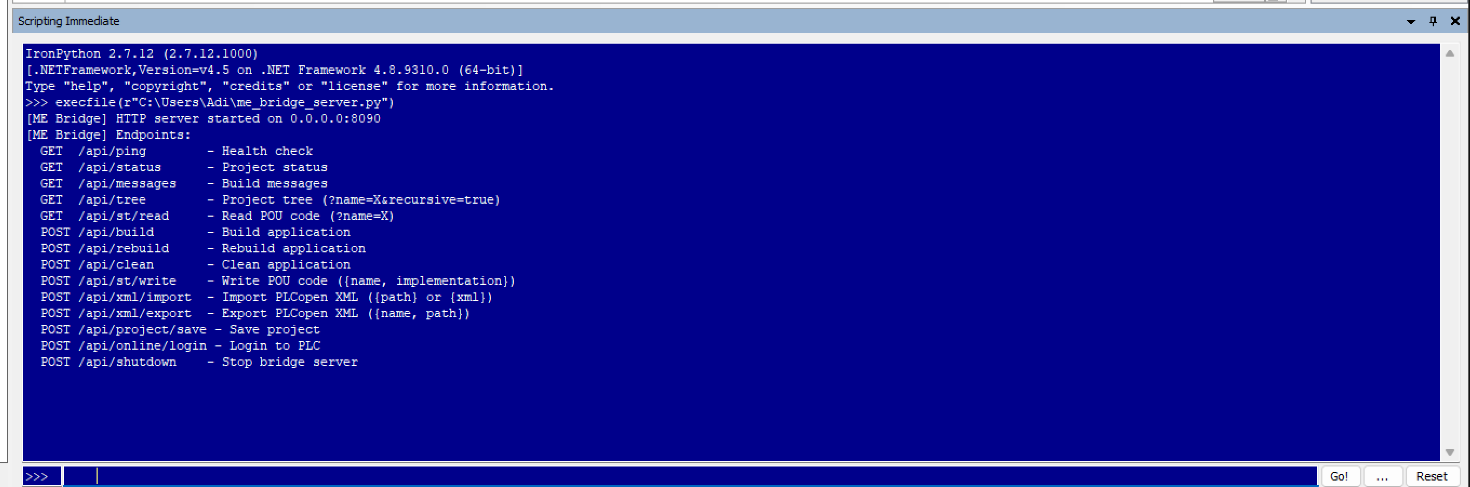
The solution is a single Python 2.7 script that runs inside Machine Expert’s IronPython engine. When executed via the Scripting Immediate panel, it starts an HTTP server on a background thread:
[Linux / Claude Code]  --HTTP-->  [Windows VM: Machine Expert + Bridge on port 8090]
                                         |
                                         v  (IronPython scripting API)
                                    [CODESYS engine]
                                         |
                                         v  (Modbus TCP via port proxy)
                                    [PLC TM241CE40R]
The bridge exposes a REST API:
GET  /api/status          - Project path, dirty flag, application name
GET  /api/tree            - List all objects (POUs, GVLs, types)
GET  /api/st/read?name=X  - Read declaration + implementation of any POU
POST /api/st/write        - Modify ST code of any POU
POST /api/build           - Compile the application
POST /api/xml/import      - Import PLCopen XML
POST /api/xml/export      - Export objects as PLCopen XML
POST /api/project/save    - Save the project
POST /api/shutdown        - Stop the bridge
Every project-touching operation is marshaled to the primary thread via system.execute_on_primary_thread(), while the HTTP server runs on a daemon thread. This is explicitly supported by CODESYS but marked “Experts Only” in their documentation.
The encoding trap
The first version worked immediately for simple operations — /api/ping, /api/status, /api/build all returned clean JSON. But when we tried to read ST code from a POU, the response was empty.
The error in Machine Expert’s console told the story:
UnicodeDecodeError: 'unknown' codec can't decode byte 0xB3 at position 8673
CODESYS returns .NET System.String objects that contain characters from the Windows codepage (in this case, ³ from the kg/m³ unit in code comments). Python 2.7’s json module tried to decode these as UTF-8 and failed.
The fix was a recursive sanitizer that forces every string through unicode() with xmlcharrefreplace fallback:
def _sanitize(obj):
    if isinstance(obj, dict):
        return {_sanitize(k): _sanitize(v) for k, v in obj.items()}
    if isinstance(obj, (list, tuple)):
        return [_sanitize(item) for item in obj]
    if isinstance(obj, bool) or isinstance(obj, (int, float)) or obj is None:
        return obj
    try:
        s = unicode(obj)
        return s.encode("ascii", "xmlcharrefreplace").decode("ascii")
    except:
        return u"<encoding error>"
After this, every POU — including those with Romanian diacritics and engineering unit symbols — serialized cleanly to JSON.
What we can do with it
With the bridge running, an AI agent on Linux has complete programmatic access to a Machine Expert project. Here’s what a typical workflow looks like:
Reading all PLC code:
$ curl -s http://<vm-ip>:8090/api/tree?recursive=true | python3 -m json.tool
{
  "objects": [
    {"name": "Continuous_Dosing_Control", "has_declaration": true, "has_implementation": true},
    {"name": "FB_BeltScale", "has_declaration": true, "has_implementation": true},
    {"name": "GVL_Dosing", "has_declaration": true},
    ...
  ],
  "count": 55
}

$ curl -s "http://<vm-ip>:8090/api/st/read?name=Continuous_Dosing_Control"
{
  "name": "Continuous_Dosing_Control",
  "declaration": "PROGRAM Continuous_Dosing_Control\nVAR\n    max_component: REAL; ...",
  "implementation": "(* Recipe calculations *)\nrecipe_density := aggregate1_target + ..."
}
Modifying code and building:
$ curl -X POST -d '{"name":"MAIN","implementation":"PRG_ModbusComm();\nPRG_Control();"}' \
    http://<vm-ip>:8090/api/st/write
{"name": "MAIN", "updated": ["implementation"]}

$ curl -X POST http://<vm-ip>:8090/api/build
{"result": "build_complete", "message_count": 0, "messages": []}
Exporting PLCopen XML for version control:
$ curl -X POST -d '{"name":"Application","path":"C:\\export.xml","recursive":true}' \
    http://<vm-ip>:8090/api/xml/export
{"result": "exported", "path": "C:\\export.xml"}
Real-world use: analyzing and modifying a dosing algorithm
The bridge proved its value immediately. We needed to understand and modify the continuous dosing algorithm for a concrete plant — a PLC program that calculates belt speeds from recipe targets, with VFD correction factors and automatic quantity tracking.
Using the bridge, the AI agent:
Read all 12 POUs and 6 GVLs from the live project, understanding the complete data flow from recipe inputs through speed calculations to VFD outputs.
Identified a design issue: the speed calculation didn’t account for different belt capacities. A belt delivering 72,000 kg/h at 100% and a cement screw delivering 19,000 kg/h at 100% would produce wrong proportions if given the same percentage setpoint.
Proposed and verified a fix: normalizing recipe targets by calibration values before calculating speed ratios. Seven lines of Structured Text, verified against spreadsheet calculations the plant operator had prepared independently.
Read the code back after the operator applied the changes in Machine Expert, confirming the modification was correct before downloading to the PLC.
All of this happened over SSH, with the AI agent running on a Linux laptop connected through a WireGuard VPN to the plant network. The PLC was accessible through a port proxy on the SCADA computer, and Machine Expert ran in a KVM virtual machine.
Bootstrap: the one manual step
The bridge requires one manual action: opening Machine Expert’s Scripting Immediate panel and typing:
execfile(r"C:\Users\Adi\me_bridge_server.py")
After that, everything is remote. The bridge survives as long as Machine Expert is open. If Machine Expert restarts, the command needs to be re-entered — or automated via UI Automation using a scheduled task.
We investigated automating this step through Windows UI Automation (finding the >>> input field by its AutomationId, setting focus, pasting via clipboard, sending Enter). It works, but is fragile and requires an interactive desktop session. For now, the manual bootstrap is acceptable — it’s a one-time action per Machine Expert session.
The CODESYS scripting API
The bridge works because CODESYS ships a comprehensive IronPython scripting API. The key objects injected into the script namespace:
projects— Open, save, close projects.projects.primaryreturns the active project.system— Message store, threading, UI control.system.execute_on_primary_thread()is the critical method for thread-safe operations.online— PLC connection, login, download, start/stop.online.create_online_application()gives access to live variable read/write.
The API is documented through .pyi stub files in the installation directory:
LogicBuilder/ScriptLib/Stubs/scriptengine/
├── ScriptProject.pyi      # Project operations, XML import/export
├── ScriptApplication.pyi  # Build, rebuild, clean, boot application
├── ScriptOnline.pyi       # PLC connection, download, variable access
├── ScriptTextualObject.pyi # Read/write ST code
├── ScriptTreeObject.pyi   # Navigate project tree
└── ScriptSystem.pyi       # Threading, messages, UI
These stubs are the Machine Expert equivalent of Control Expert’s XSD schemas — the undocumented key that makes programmatic access possible.
What’s next
The bridge opens up possibilities we’re still exploring:
- Automated regression testing: modify a POU, build, check for errors, revert — all in a script.
- Live variable monitoring: the
ScriptOnlineApplication.read_value()method can read PLC variables in real-time, enabling AI-assisted debugging. - Continuous deployment: modify code, build, download to PLC, verify — a CI/CD pipeline for industrial automation.
- Multi-project management: the same bridge pattern should work for any CODESYS 3.5-based IDE (ABB Automation Builder, WAGO e!COCKPIT, etc.) — untested, but the scripting API is shared.
The fundamental insight is the same one from our Control Expert work: industrial automation tools have more programmatic access than their vendors advertise. You just have to look in the installation directory.
The Machine Expert HTTP Bridge is an IronPython 2.7 script (~500 lines) that runs inside EcoStruxure Machine Expert V2.3. It requires no license beyond the standard Machine Expert installation. Download the bridge script (me_bridge_server.py).